---
title: "Customizing Invitation Emails"
slug: "customizing-invitation-emails"
updated: 2026-11-05T19:41:27Z
published: 2026-11-05T19:41:27Z
canonical: "docs.onespan.com/customizing-invitation-emails"
---
> ## Documentation Index
> Fetch the complete documentation index at: https://docs.onespan.com/llms.txt
> Use this file to discover all available pages before exploring further.
# Customizing Invitation Emails
[Java SDK](/v1/docs/customizing-invitation-emails#java-sdk) [.NET SDK](/v1/docs/customizing-invitation-emails#net-sdk) [REST API](/v1/docs/customizing-invitation-emails#rest-api) [APEX SDK](/v1/docs/customizing-invitation-emails#apex-sdk)
## Java SDK
To download the full code sample see our [Code Share](https://community.onespan.com/documentation/onespan-sign/codeshare/signer-specific-email-message-java-sdk/) site.
When sending transactions for signing you can fully customize the emails your signers receive. Customization can be applied on both the Transaction level, and by Signer.
There is a 4000 character limit for messages. The 4,000-character limit applies to the message as it is stored, not just the text you see. If your message contains HTML, the tags count toward the limit along with the visible text. For example, Hello is stored as 12 characters, even though only 5 are displayed. So a message with HTML can go over the limit even when the visible text is well under 4,000 characters. To avoid this, keep HTML formatting to a minimum, or leave room below the limit when you use it.
### Customizing emails by transaction
You can add a transaction level message for all signers in the transaction. The following code will do this.
```java
DocumentPackage pkg = PackageBuilder.newPackageNamed("Example Package " + System.currentTimeMillis()).withEmailMessage("This is a package level email message.").......build();
```
### Customizing emails by Signer
You can add a transaction level message for each signer in the transaction. Signer level messages override the transaction level message. The following code will do this.
```java
Signer signer2=SignerBuilder.newSignerWithEmail("signer2@example.com") .withEmailMessage("This is a signer level email message for signer2.") ...... .build();
```
### Customizing emails by transaction and Signer
The following code will customize messages at both the transaction level, and by signer.
```java
DocumentPackage pkg1 = PackageBuilder.newPackageNamed("Example Package " + System.currentTimeMillis()) .withSigner(SignerBuilder.newSignerWithEmail("signer1@example.com" ) .withFirstName("John") .withLastName("Smith")) .withSigner(SignerBuilder.newSignerWithEmail("signer2@example.com" ) .withFirstName("Marry") .withLastName("Doe") .withEmailMessage("This is a signer level email message for signer2.")) .withDocument(DocumentBuilder.newDocumentWithName("document 1") .fromFile("P:\\Documents\\documents-example\\Test PDF.pdf") .withSignature(SignatureBuilder.signatureFor("signer1@example.com") .onPage(0) .atPosition(100, 100) .withSize(250, 75)) .withSignature(SignatureBuilder.signatureFor("signer2@example.com") .onPage(0) .atPosition(200, 100) .withSize(250, 75))) .withEmailMessage("This is a package level email message.") .build();
```
### Results
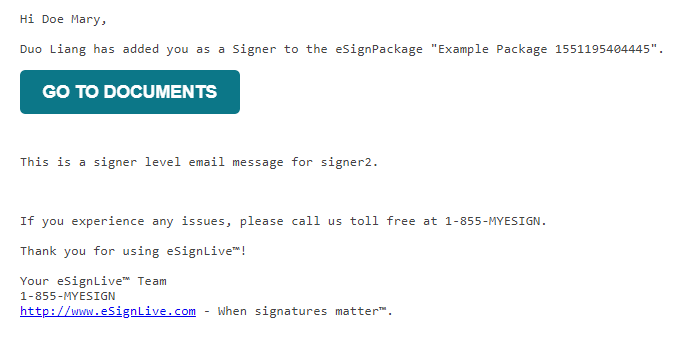
Here is an example of what you can expect to see once you have run your code.

Signer2:
## .NET SDK
To download the full code sample see our [Code Share](https://community.onespan.com/documentation/onespan-sign/codeshare/signer-specific-email-message-net-sdk/) site.
When sending transactions for signing you can fully customize the emails your signers receive. Customization can be applied on both the Transaction level, and by Signer.
There is a 4000 character limit for messages. The 4,000-character limit applies to the message as it is stored, not just the text you see. If your message contains HTML, the tags count toward the limit along with the visible text. For example, Hello is stored as 12 characters, even though only 5 are displayed. So a message with HTML can go over the limit even when the visible text is well under 4,000 characters. To avoid this, keep HTML formatting to a minimum, or leave room below the limit when you use it.
### Customizing emails by transaction
You can add a transaction level message for all signers in the transaction. The following code will do this.
```csharp
DocumentPackage pkg = PackageBuilder.NewPackageNamed("Example Package " + System.DateTime.Now) .WithEmailMessage("This is a package level email message.") ...... .Build();
```
### Customizing emails by Signer
You can add a transaction level message for each signer in the transaction. Signer level messages override the transaction level message. The following code will do this.
```csharp
Signer signer2 = SignerBuilder.NewSignerWithEmail("signer2@example.com") .WithEmailMessage("This is a signer level email message for signer2.") ...... .Build();
```
### Customizing emails by transaction and Signer
The following code will customize messages at both the transaction level, and by signer.
```csharp
DocumentPackage pkg1 = PackageBuilder.NewPackageNamed("Example Package " + System.DateTime.Now) .WithSigner(SignerBuilder.NewSignerWithEmail("signer1@example.com" ) .WithFirstName("John") .WithLastName("Smith")) .WithSigner(SignerBuilder.NewSignerWithEmail("signer2@example.com" ) .WithFirstName("Marry") .WithLastName("Doe") .WithEmailMessage("This is a signer level email message for signer2.")) .WithDocument(DocumentBuilder.NewDocumentNamed("document 1") .FromFile("P:\\Documents\\documents-example\\Test PDF.pdf") .WithSignature(SignatureBuilder.SignatureFor("signer1@example.com") .OnPage(0) .AtPosition(100, 100) .WithSize(250, 75)) .WithSignature(SignatureBuilder.SignatureFor("signer2@example.com") .OnPage(0) .AtPosition(200, 100) .WithSize(250, 75))) .WithEmailMessage("This is a package level email message.") .Build();
```
### Results
Here is an example of what you can expect to see once you have run your code.

Signer2:

## REST API
To download the full code sample see our [Code Share](https://community.onespan.com/documentation/onespan-sign/codeshare/signer-specific-email-message-rest-api/) site.
When sending transactions for signing you can fully customize the emails your signers receive. Customization can be applied on both the Transaction level, and by Signer.
There is a 4000 character limit for messages. The 4,000-character limit applies to the message as it is stored, not just the text you see. If your message contains HTML, the tags count toward the limit along with the visible text. For example, Hello is stored as 12 characters, even though only 5 are displayed. So a message with HTML can go over the limit even when the visible text is well under 4,000 characters. To avoid this, keep HTML formatting to a minimum, or leave room below the limit when you use it.
### Customizing emails by transaction
You can add a transaction level message for all signers in the transaction. The following code will do this.
#### HTTP Request
`PUT /api/packages/{packageId}`
#### HTTP Headers
```http
Accept: application/json
Content-Type: application/json
Authorization: Basic api_key
```
#### Request Payload
```http
{ "emailMessage": "Changed package level email message." }
```
### Customizing emails by Signer
You can add a transaction level message for each signer in the transaction. Signer level messages override the transaction level message. The following code will do this.
#### HTTP Request
`POST /api/packages/{packageId}/roles`
#### HTTP Headers
```http
Accept: application/json
Content-Type: application/json
Authorization: Basic api_key
```
#### Request Payload
```json
{
"emailMessage": {
"content": "Please sign the documents ASAP."
}
,
"id": "Signer5",
"reassign": true,
"type": "SIGNER",
"signers": [ { "email": "mail32@example.com", "firstName": "John", "lastName": "Smith", "id": "Signer5" } ],
"name": "Signer5"
}
```
For a complete description of each field, see the Request Payload table below.
#### Response Payload
```json
{
"id": "Signer5",
"data": null,
"specialTypes": [],
"emailMessage": {
"content": "Please sign the documents ASAP."
}
,
"attachmentRequirements": [],
"locked": false,
"reassign": true,
"index": 0,
"signers": [ { "group": null, "language": "en", "signature": null, "id": "Signer5", "delivery": { "provider": false, "email": false, "download": false } , "auth": { "scheme": "NONE", "challenges": []
}
,
"knowledgeBasedAuthentication": null,
"data": null,
"title": "",
"company": "",
"email": "mail32@example.com",
"firstName": "John",
"lastName": "Smith",
"external": null,
"updated": "2017-11-16T16:53:01Z",
"phone": "",
"professionalIdentityFields": [],
"userCustomFields": [],
"address": null,
"created": "2017-11-16T16:53:01Z",
"name": "",
"specialTypes": []
}
],
"name": "Signer5",
"type": "SIGNER"
}
```
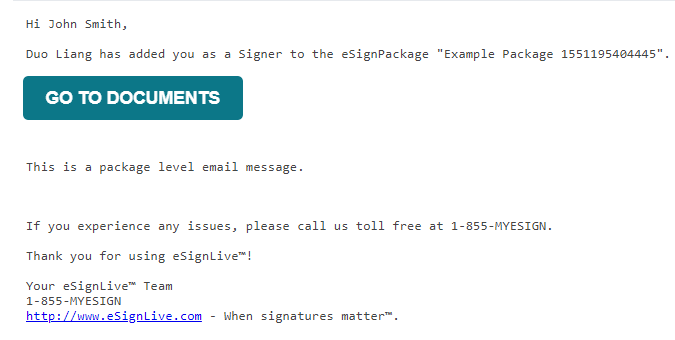
### Results
Here is an example of what you can expect to see once you have run your code.
### Request Payload Table
| Property | Type | Editable | Required | Default | Sample Values |
| --- | --- | --- | --- | --- | --- |
| Property | Type | Editable | Required | Default | Sample Values |
| id | string | Yes | No | n/a | Signer5 |
| emailMessage | | | | | |
| content | string | Yes | No | n/a | Please sign the documents ASAP. |
| name | string | Yes | No | n/a | Signer5 |
| id | string | Yes | No | n/a | Signer5 |
| type | string | Yes | No | SIGNER | SIGNER / SENDER |
| signers | | | | | |
| email | string | Yes | No | n/a | mail32@example.com |
| firstName | string | Yes | No | n/a | John |
| lastName | string | Yes | No | n/a | Smith |
| id | string | Yes | No | n/a | Signer5 |