The onboarding process for Central Admin Login includes:
The initial setup, which is handled by OneSpan Support
Account provisioning, which is handled by the Account Admin
Passkey registration, which must be completed by all users.
Initial setup
OneSpan Support will:
Set up Central Admin Login for your company’s OneSpan account, which includes specifying:
any domains that are associated with your organization
any OneSpan products that your organization has purchased.
Create the first user account, which is reserved for the Account Admin.
Invite the Account Admin to register their passkey.
Account provisioning
Once the first Account Admin is granted access, they will be responsible for:
creating accounts for other admins
including additional Account Admins who will serve as their backup.
inviting admins to sign up
assigning roles to admins
managing product access for admins.
For more information, see User and account management.
Passkey registration
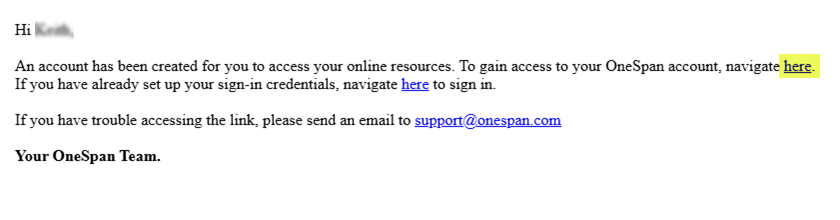
Once an account is created, the account holder will be asked to create a passkey. This is usually accomplished with a magic link — a one-time-use token that enables temporary access for passkey registration.
The account holder will receive an email with instructions on how to access the account.
Click on the first link and follow the instructions to create a passkey.
Magic links are only as secure as the recipient’s email account. Alternatively, a registration code can be generated and shared with the account holder. For more information, contact OneSpan Support.