The multi-device activation process of Digipass authenticators comprises the following steps:
generate Activation Message 1
generate Activation Message 2
validate message signature
The following diagram provides an overview of the activation integration.
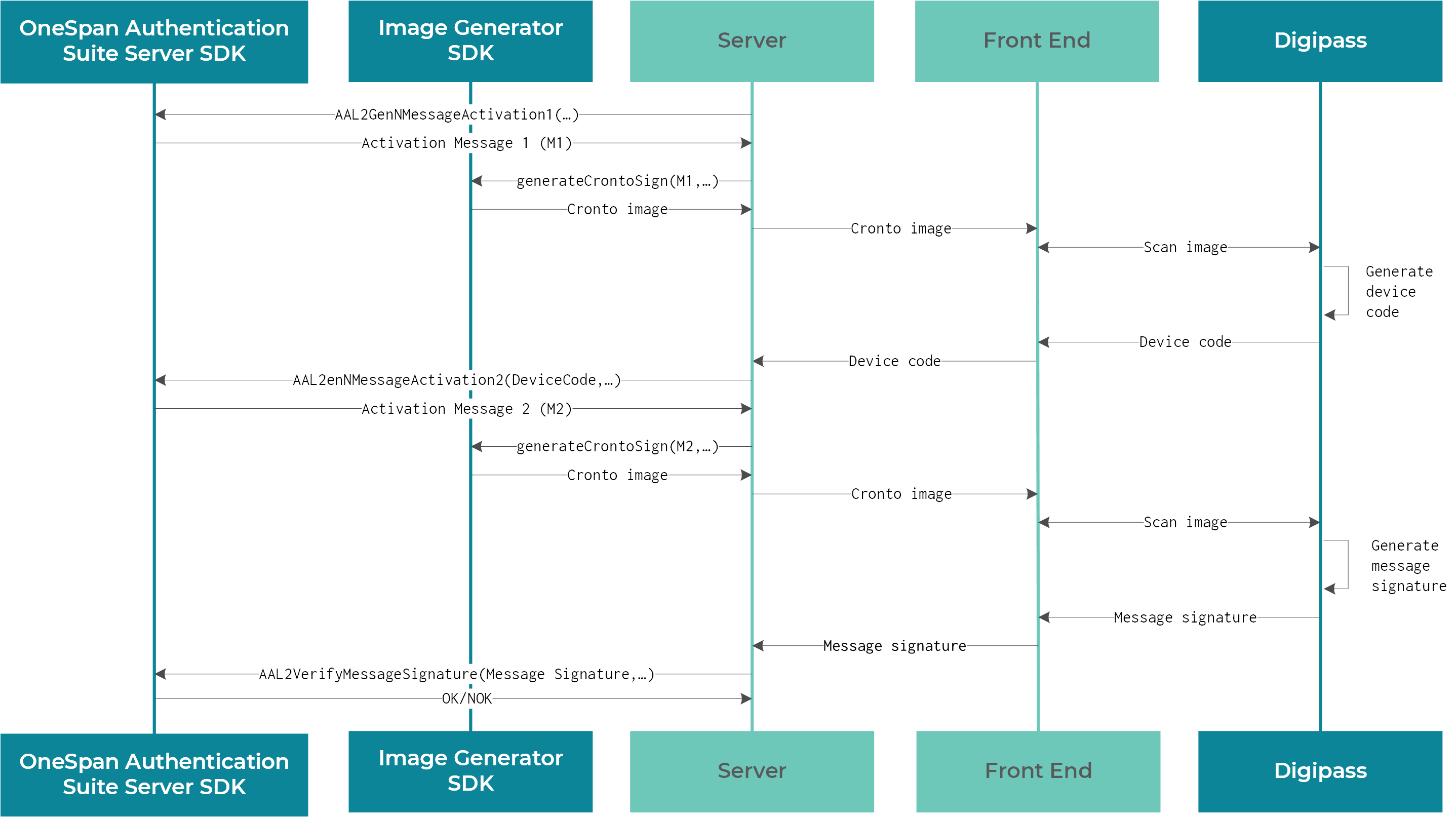
Digipass authenticator activation process
Generate Activation Message 1:
Authentication Suite Server SDK generates Activation Message 1 for the given user license with the
AAL2GenMessageActivation1function.This Activation Message 1 is converted into a Cronto image with the
generateCrontoSignfunction of the Image Generator SDK.The client reads this image and generates a device code that contains the client device ID.
Generate Activation Message 2:
Authentication Suite Server SDK verifies the device code, generated in the previous step, with the
AAL2VerifyDeviceCodefunction.Authentication Suite Server SDK generates Activation Message 2 for the given user license and its device ID with the
AAL2GenMessageActivation2function.This Activation Message 2 is converted into a Cronto image with the
generateCrontoSignfunction of the Image Generator SDK.The client reads this image and generates a message signature.
Validate the message signature:
Authentication Suite Server SDK verifies this message signature with the
AAL2VerifyMessageSignaturefunction. Once that is completed, the server considers the client as activated.
For more information, see the Authentication Suite Server SDK Product Guide, section Digipass Multi-Device Activation Service.