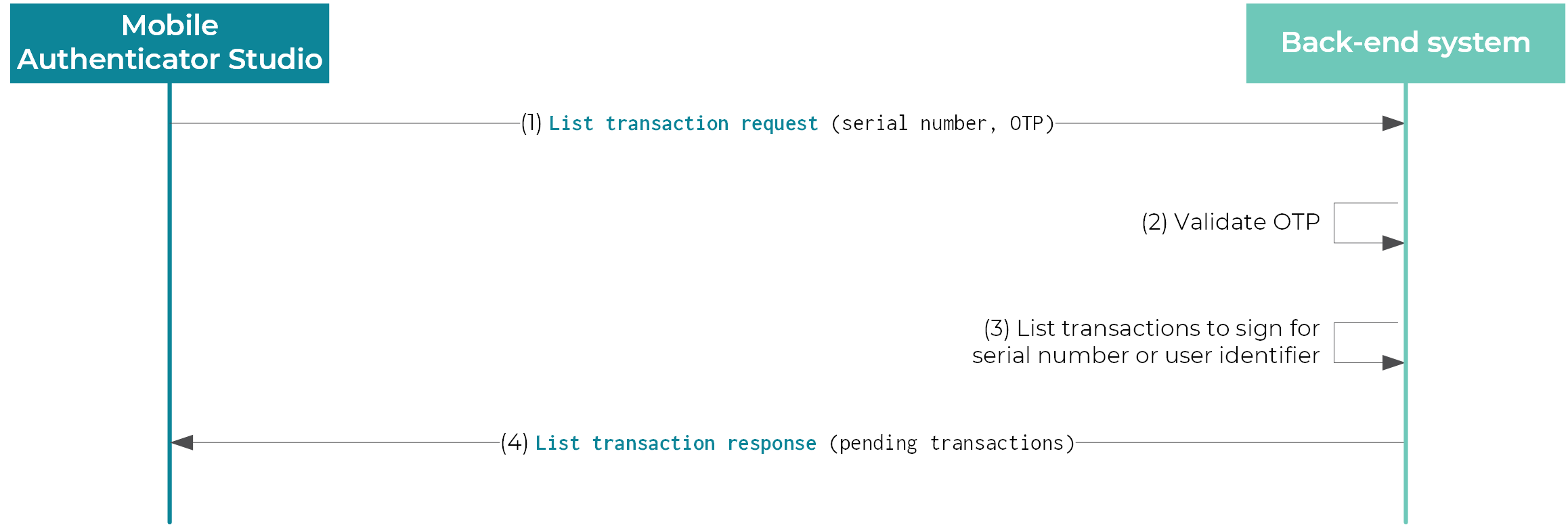
--- title: "Transaction data signing" slug: "mas-5-ig-txn-signing-5-7-0" updated: 2026-06-22T09:11:40Z published: 2026-06-22T09:11:40Z canonical: "docs.onespan.com/mas-5-ig-txn-signing-5-7-0" excludeFromSearch: true --- > ## Documentation Index > Fetch the complete documentation index at: https://docs.onespan.com/llms.txt > Use this file to discover all available pages before exploring further. # Transaction data signing ## Listing transactions to sign With transaction data signing enabled, Mobile Authenticator Studio is able to retrieve a list of transactions on user demand, and sign each transaction locally. The signature is then sent back to a server for validation. ![Listing pending transactions (Overview)](https://cdn.document360.io/038f59a7-abd0-4c14-9de7-3434d28b49fd/Images/Documentation/List_pending_transactions.png?sv=2026-02-06&spr=https&st=2026-11-16T15%3A30%3A10Z&se=2026-11-16T16%3A30%3A10Z&sr=b&sp=r&sig=JuWEaywGO%2Fxi9foCHhm7voDhzZtuLNOWxTuxSQ25O90%3D) Listing pending transactions (overview) Integrating transaction data signing involves the following steps: 1. The app submits an HTTP(S) request to the integrator back-end system. The request contains a one-time password (OTP) to authenticate the issuer. 2. The integrator validates the OTP. 3. On successful authentication, the list of pending transactions can be retrieved from the database. 4. The response that contains the transaction list is sent back to the app. ### Transaction list request The request sent by Mobile Authenticator Studio is configured in the TransactionList section of the configuration file: The URL can use the HTTP POST or GET methods. | Transaction list request parameters | | --- | | Parameter name | Description | | SerialNumber | The authenticator serial number. Format: Alphanumeric string, 10 characters | | RegistrationIdentifier | The identifier provided by the user via the online activation screen of the Mobile Authenticator Studio app. Format: Alphanumeric string, limited to 40 characters | | UserIdentifier | The extra user identifier that has been set during activation. Format: Alphanumeric string, limited to 40 characters | | OTP | The OTP generated by the cryptographic application defined by the authenticationCryptoAppIndex attribute of the TransactionDataSigningAction element. Format: Hexadecimal string, limited to 16 characters | | Version | The version of the application binary as defined when configuring the app. | | DeviceIdentifier | The device-unique identifier. Format: String of 64 hexadecimal characters | ### Transaction list response The transaction content can be used for a standard transaction (i.e. with up to 8 data fields) or a Secure Channel transaction. The response expected by Mobile Authenticator Studio must be formatted as described in the DTD: 1. 2. 3. 4. 5. 6. 7. 8. 9. 10. 11. 12. 13. 14. 15. 16. 17. 18. 19. If the transaction content is used for a standard transaction, the secureChannelMessage attribute must be empty. Example ```xml                                                                               ``` If the transaction content is used for a Secure Channel transaction, no item element must be present. Example ```xml             ``` | Transaction list response attributes | | --- | | Attribute name | Description | | //DP4Mobile/@retCode | Required. The return code associated with the transaction list request. 0 means success, any other value will cause the message attribute value to be displayed and the list transaction to stop. | | //DP4Mobile/@message | Required. The return message associated with the transaction list request. This value will be displayed by the app if not 0. | | //DP4Mobile/@serverTime | Optional. This is the current server GMT time. This value will be used by the app to silently set the drift between device and server time to keep the app synchronized. | | //Transaction/@identifier | The unique identifier of a transaction. It is not displayed, but only used to uniquely trace a transaction during the signing process. Format: Alphanumeric string | | //Transaction/@name | The name of the transaction as displayed on the device. Format: Alphanumeric string | | //Transaction /@secureChannelMessage | The Secure Channel message. This parameter is mandatory for Secure Channel transactions, but must not be present for standard transaction. Format: Hexadecimal string | Each transaction contains a list of items that will be displayed in the app. Each item has a number of attributes. For Secure Channel transactions, no item must be present. | Transaction item attributes | | --- | | Attribute name | Description | | //Item/@value | The text as displayed on the device. Format: Alphanumeric string | | //Item/@bold | Indicates whether the text is in bold. | | //Item/@align | Indicates whether the text is in left-, center-, or right-aligned. | | //Item/@italic | Indicates whether the text is in italics. | | //Item/@dtfIndex | Indicates whether the item value is signed as a data field. If omitted, the text is not signed. | | //Item/@hidden | Indicates whether the text is visible. | ## Validating transactions ### Internal transaction validation ![Internal transaction validation (Overview)](https://cdn.document360.io/038f59a7-abd0-4c14-9de7-3434d28b49fd/Images/Documentation/Transaction_validation_internal.png?sv=2026-02-06&spr=https&st=2026-11-16T15%3A30%3A10Z&se=2026-11-16T16%3A30%3A10Z&sr=b&sp=r&sig=g%2FRQ7l0ZqL%2Buv15nOmsrobPHHk1xNQmsm%2BKAEgp5Zp0%3D) Internal transaction validation (overview) Once Mobile Authenticator Studio has signed the content of a transaction, it can manage the validation of the transaction inside the app by connecting to a web service. The web service must be able to validate the signature of a transaction identified by its unique transaction identifier. The request sent by Mobile Authenticator Studio is configured in the TransactionValidation section of the configuration file: The URL can use the HTTP POST or GET methods. | Internal transaction validation parameters | | --- | | Parameter name | Description | | SerialNumber | The authenticator serial number. Format: Alphanumeric string, 10 characters | | RegistrationIdentifier | The identifier provided by the user via the online activation screen of the Mobile Authenticator Studio app. Format: Alphanumeric string, limited to 40 characters | | UserIdentifier | The extra user identifier that has been set during activation. Format: Alphanumeric string, limited to 40 characters | | OTP | The signature generated by the cryptographic application defined by the signatureCryptoAppIndex attribute of the TransactionDataSigningAction element. | | TransactionIdentifier | The unique identifier of a transaction. Format: Alphanumeric string | | Version | The version of the application binary as defined when configuring the app. | | DeviceIdentifier | The device-unique identifier. Format: String of 64 hexadecimal characters | The response expected by Mobile Authenticator Studio must be formatted as described in the DTD: 1. 2. 3. 4. 5. Example ```xml   ``` A confirmation code attribute can be added to the response. It will be displayed by the app together with the message. | Internal transaction validation response attributes | | --- | | Attribute name | Description | | //DP4Mobile/@retCode | Required. The return code associated with the transaction validation request. 0 means success, any other value will cause the message attribute value to be displayed and the transaction data signing process to stop. | | //DP4Mobile/@message | Required. The return message associated with the transaction validation request. This value will be displayed by the app if not empty. | | //DP4Mobile/@serverTime | Optional. This is the current server GMT time. This value will be used by the app to silently set the drift between device and server time to keep the app synchronized. | | //DP4Mobile/@confirmationCode | Optional. The server return host code. If provided, it will be displayed along with the message. | ### Rejecting transactions ![Transaction rejection (Overview)](https://cdn.document360.io/038f59a7-abd0-4c14-9de7-3434d28b49fd/Images/Documentation/Transaction_rejection.png?sv=2026-02-06&spr=https&st=2026-11-16T15%3A30%3A10Z&se=2026-11-16T16%3A30%3A10Z&sr=b&sp=r&sig=jAw7c6mwwbUARxh2M2fhaTVD14fLfJhi3M53qcBPb7g%3D) Transaction rejection (overview) The user can reject a transaction. When a transaction is rejected, no signature will be generated and the transaction will be removed from the list of pending transactions. Transaction rejection is managed by connecting to a web service. The request sent by Mobile Authenticator Studio is configured for every TransactionDataSigningAction element of the configuration file: The URL can use the HTTP POST or GET methods. | Transaction rejection parameters | | --- | | Parameter name | Description | | SerialNumber | The authenticator serial number. Format: Alphanumeric string, 10 characters | | RegistrationIdentifier | The identifier provided by the user via the online activation screen of the Mobile Authenticator Studio app. Format: Alphanumeric string, limited to 40 characters | | UserIdentifier | The extra user identifier that has been set during activation. Format: Alphanumeric string, limited to 40 characters | | TransactionIdentifier | The unique identifier of a transaction. Format: Alphanumeric string | | Version | The version of the application binary as defined when configuring the app. | | DeviceIdentifier | The device-unique identifier. Format: String of 64 hexadecimal characters | > Transaction rejection is only available for Android and iOS. The response expected by Mobile Authenticator Studio must be formatted as described in the DTD: 1. 2. 3. 4. Example ```xml   ``` A confirmation code attribute can be added to the response. It will be displayed by the application along with the message. | Transaction rejection response attributes | | --- | | Attribute name | Description | | //DP4Mobile/@retCode | Required. The return code associated with the transaction rejection request. 0 means success, any other value will cause the message attribute value to be displayed and the transaction data signing process to stop. | | //DP4Mobile/@message | Required. The return message associated with the transaction rejection request. This value will be displayed by the app if not empty. | | //DP4Mobile/@serverTime | Optional. This is the current server GMT time. This value will be used by the app to silently set the drift between device and server time to keep the app synchronized. |