Before you can install your OneSpan Authentication Server Virtual Appliance instance, you need to create a new virtual machine (VM) with the vSphere Client application.
When you create a new virtual machine to host OneSpan Authentication Server Virtual Appliance, you need to use some special configuration settings.
Prerequisites
Before you create and configure a new virtual machine, ensure that you have the following:
- A OneSpan Authentication Server Virtual Appliance installation ISO image and a valid product license.
- Access to a computer with a web browser.
- An ESXi account with administrative privileges.
Configuring the virtual machine
For more information about creating a virtual machine, refer to the official ESXi documentation, available at techdocs.broadcom.com.
To configure the virtual machine
On the Customize settings page, set VM Options > Boot Options > Firmware to BIOS. Make sure that UEFI is disabled.
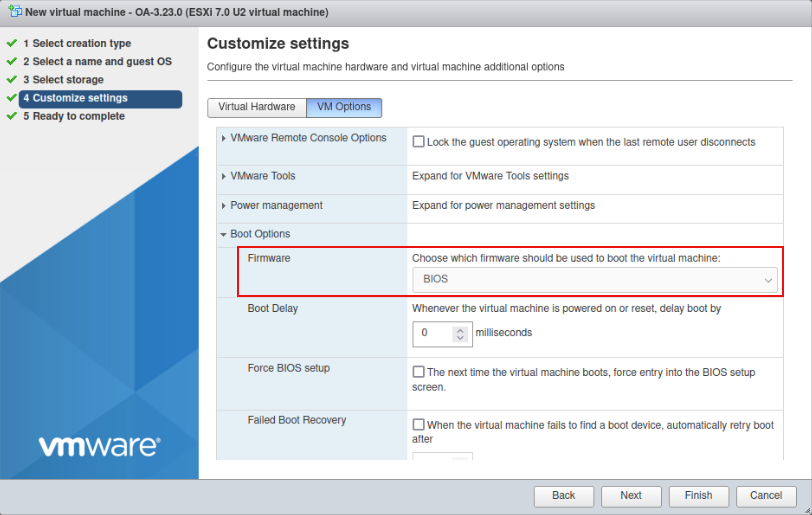
Figure: Customize settings – VM Options > Boot Options
Set Virtual Hardware > SCSI Controller 0 to VMware Paravirtual.
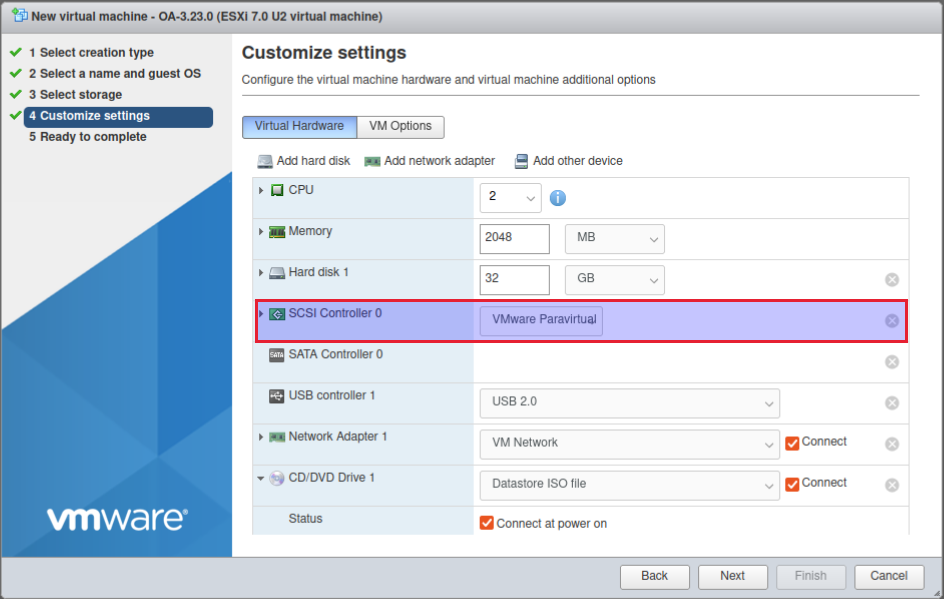
Figure: Customize settings – Virtual Hardware > SCSI Controller