Plan your Password Synchronization Manager installation
Password Synchronization Manager consists of two essential components:
PSM Password Filter for Active Directory (AD)
PSM Remote Configuration Manager
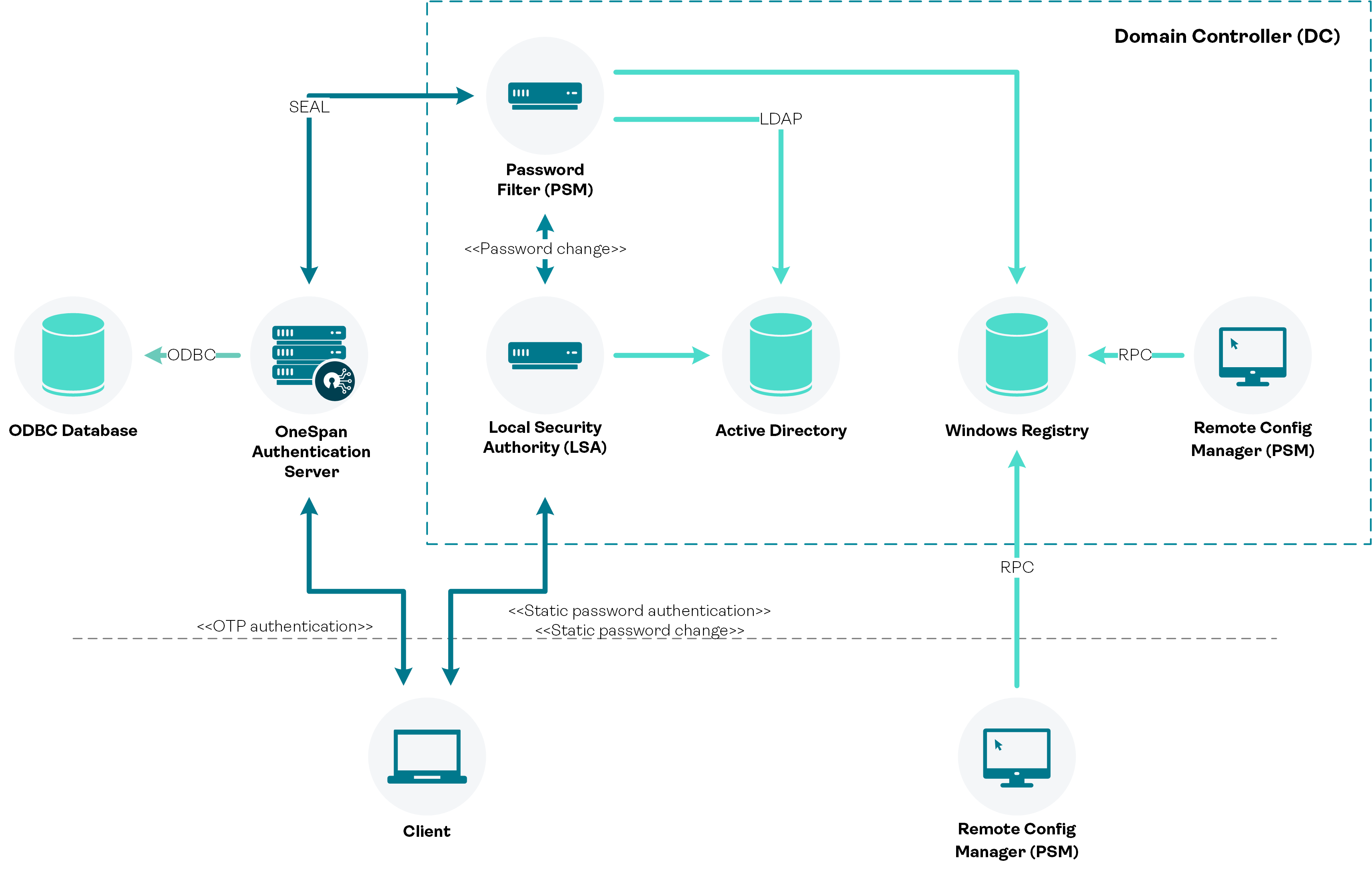
Figure: Password Synchronization Manager - architectural overview
Allow password filter registration
To track password change requests, Password Synchronization Manager installs a password filter, which needs to be registered with and loaded by the Local Security Authority (LSA) under the SYSTEM account.
The password filter is registered by adding the absolute path and file name of the password filter library (VdsPwdFlt.dll) to Notification Packages (MULTI_REG_SZ) under the following Windows registry key:
[HKEY_LOCAL_MACHINE\SYSTEM\CurrentControlSet\Control\Lsa]
Ensure that your security policy does not prevent this key value from being written by the setup program.
For changes to settings in the LSA registry key to take effect, you need to reboot the computer.
Administrator privileges
To install Password Synchronization Manager you need to be logged on with a user that has local administrator privileges.