With Intelligent Adaptive Authentication you can implement functionality for your users to log in to your web application through the use of a virtual authenticator via the Intelligent Adaptive Authentication platform. A one-time password (OTP) is generated by the Authentication component and delivered via SMS, email, or voice call, depending on the policy set within the Intelligent Adaptive Authentication component. Intelligent Adaptive Authentication offers two modes to integrate the user login flow: the synchronous and the asynchronous login mode.
User login via notification—process overview
When a user with an assigned virtual authenticator logs in without providing their credentials to the Login service (TID web service), the Risk Management component server answers with a challenge. The value of the returned challenge depends on the selected notification type: 3 for SMS, 8 for email, and 13 for voice call.
This challenge also invokes Intelligent Adaptive Authentication to create an OTP. Depending on the selected notification mode, the OTP will be delivered to the user as SMS (via the SMS service) to the mobile phone number associated with this user in the user profile, the email address of the user if an email account has been defined for this user, or as a voice call to the user if a landline phone number has been defined for this user.
The user is informed about the challenge via the selected notification mode during the first login response. When the user receives the notifcation, they can extract the OTP from the message and continue the login procedure, including the OTP in the request to the TID web server. The TID web service receives the OTP and checks it against the Authentication service. When the OTP validation is successful, the login can be completed.
Integration of user login via notification with SMS
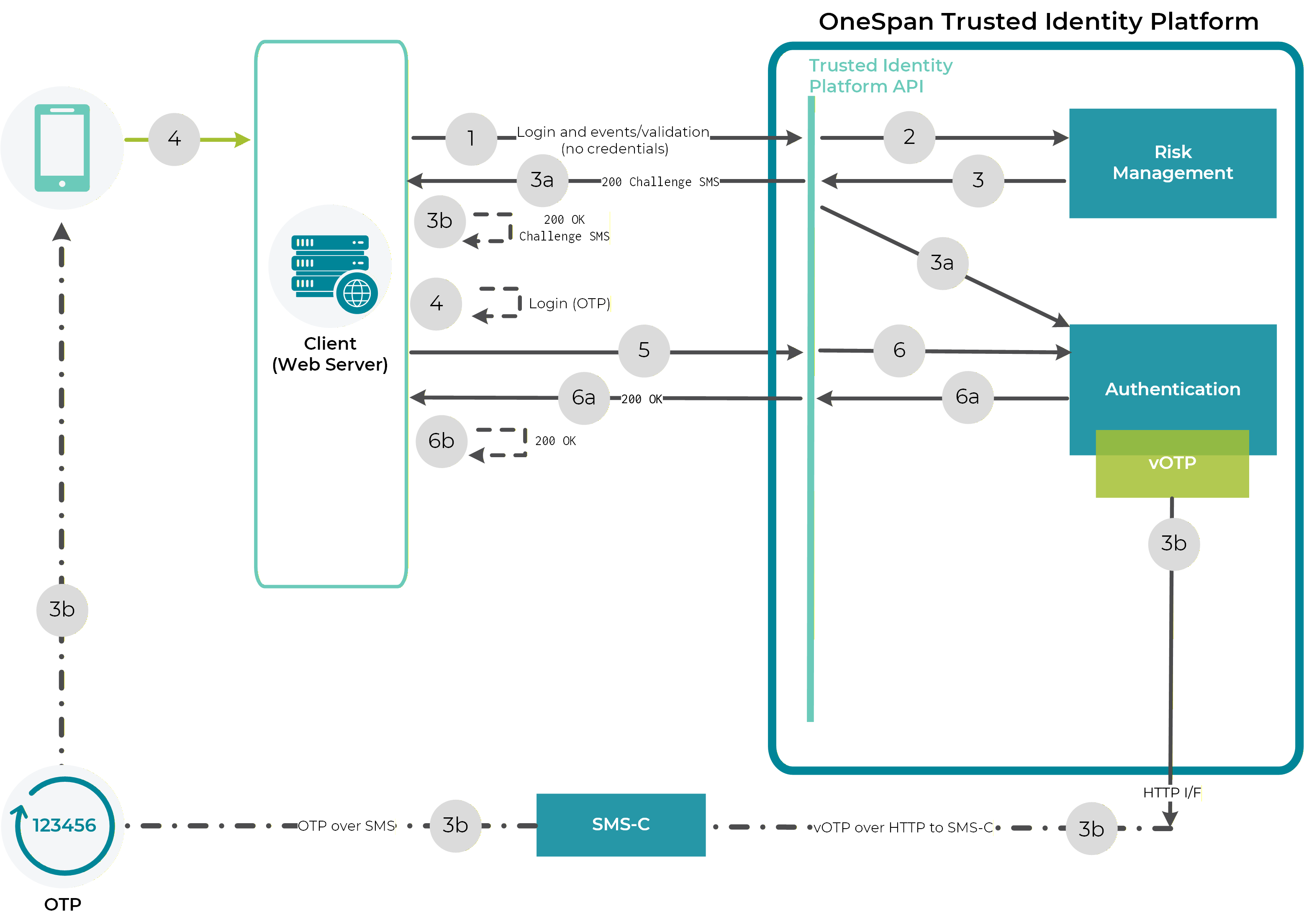
Virtual authenticator OTP via SMS
Sequence of a user login operation via notification with SMS
Before starting the operation, ensure the correct state of the user account by validating the output of the GET /users/{userID@domain} endpoint.
The user initiates the login operation and triggers the client application to send a login and event validation request. This request includes the following parameters:
authenticator user
authenticator domain
CDDC data
session identifier
The user's credentials (static password) must not be included in the request input!
The web service triggers a Risk Management component-event request for the login.
The Risk Management component responds with an SMS challenge.
The TID web service requests Intelligent Adaptive Authentication to create an OTP and to deliver it via SMS as defined in the user settings.
The web service returns the SMS challenge to the client application.
The user collects the OTP received via SMS.
The user attempts to log in with the retrieved OTP.
The client application sends the OTP to the web service.
The web service validates the OTP with Intelligent Adaptive Authentication. The validation result includes the serial number of the used authenticator.
The web service returns to the client application that the authentication has been successful.
The client application checks the status of the login request with the web service.
Integration of user login via notification with email
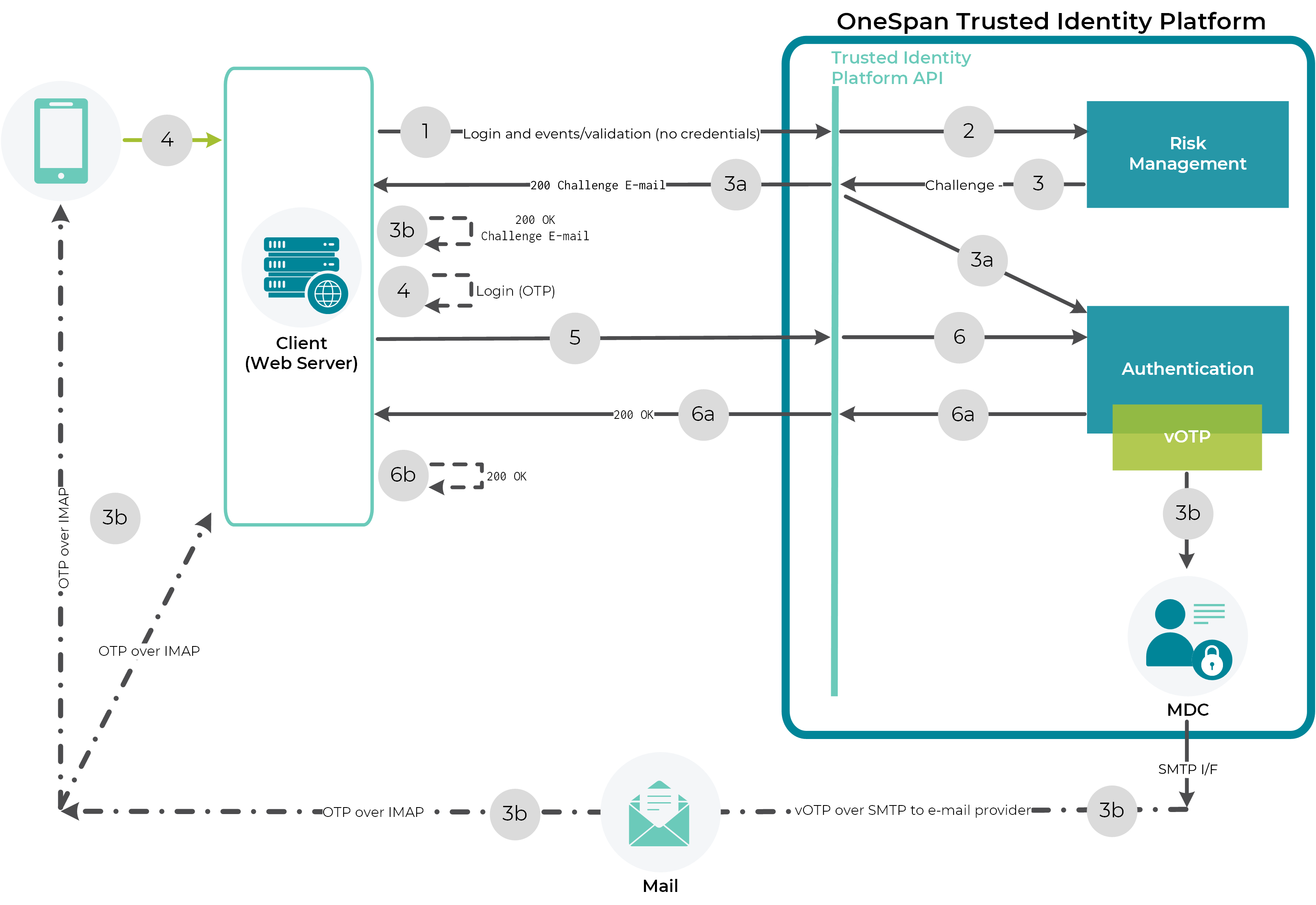
Virtual authenticator OTP via email
Sequence of a notification user login operation via email
Before starting the operation, ensure the correct state of the user account by validating the output of the GET /users/{userID@domain} endpoint.
The user initiates the login operation and triggers the client application to send login and event validation request. This request includes the following parameters:
authenticator user
authenticator domain
CDDC data
session identifier
The user's credentials (static password) must not be included in the request input!
The web service triggers a Risk Management component-event request for the login.
The Risk Management component responds with an email challenge.
The TID web service requests Intelligent Adaptive Authentication to create an OTP and to deliver via email as defined in the user settings.
The web service returns the email challenge to the client application.
The user collects the OTP received via email.
The user attempts to log in with the retrieved OTP.
The client application sends the OTP to the web service.
The web service validates the OTP with Intelligent Adaptive Authentication. The validation result includes the serial number of the used authenticator.
The web service returns to the client application that authentication has been successful.
The client application checks the status of the login request with the web service.
Integration of user login via notification with voice call
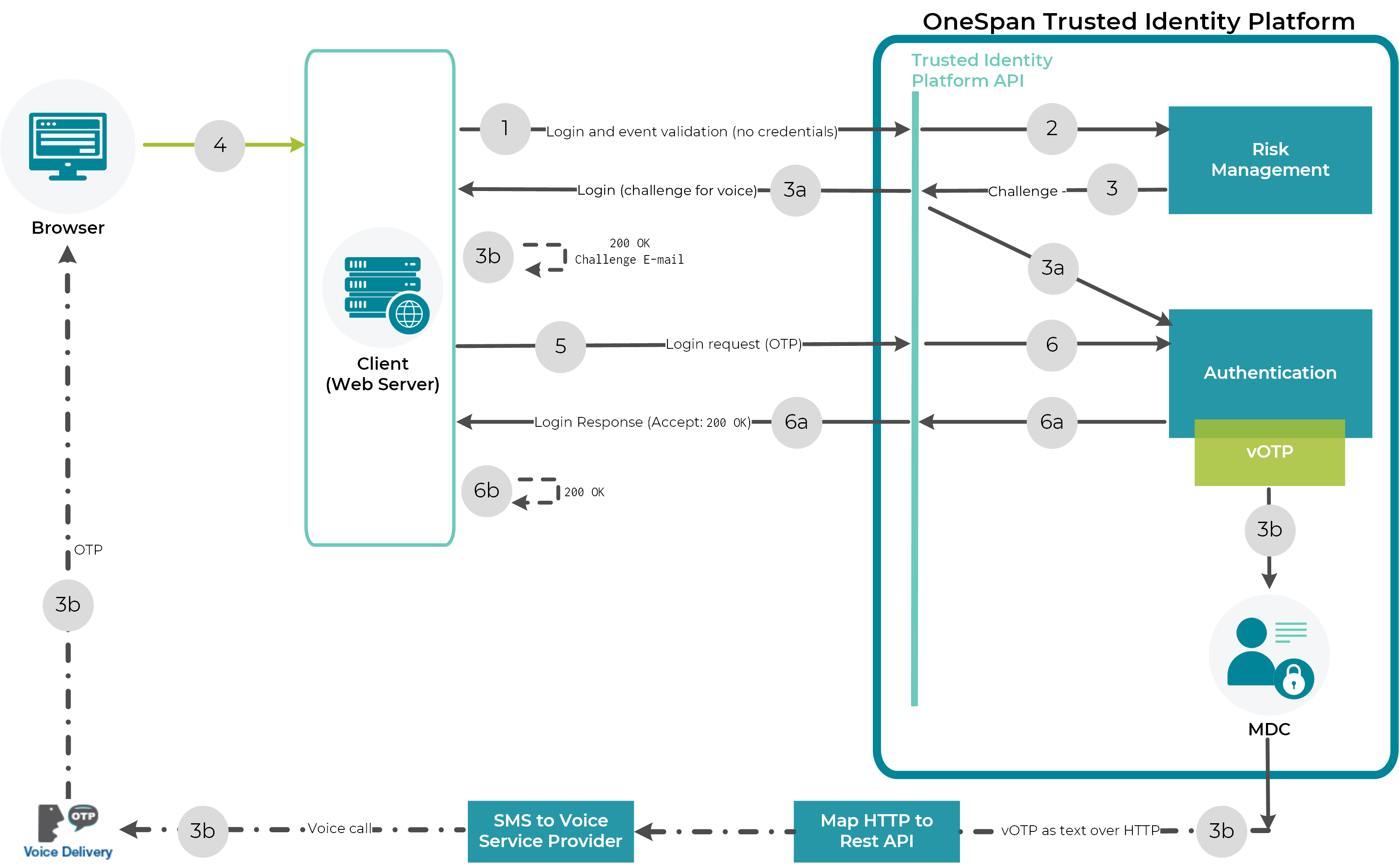
Virtual authenticator OTP via voice call
Sequence of a user login operation via notification with voice call
Before starting the operation, ensure the correct state of the user account by validating the output of the GET /users/{userID@domain} endpoint.
The user initiates the login operation and triggers the client application to send login and event validation request. This request includes the following parameters:
authenticator user
authenticator domain
CDDC data
session identifier
The user's credentials (static password) must not be included in the request input!
The web service triggers a Risk Management component-event request for the login.
The Risk Management component responds with a voice challenge.
The TID web service requests Intelligent Adaptive Authentication to create an OTP and to deliver via voice call as defined in the user settings.
The web service returns the voice challenge to the client application.
The user collects the OTP received via voice call.
The user attempts to log in with the retrieved OTP.
The client application sends the OTP to the web service.
The web service validates the OTP with Intelligent Adaptive Authentication. The validation result includes the serial number of the used authenticator.
The web service returns to the client application that authentication has been successful.
The client application checks the status of the login request with the web service.
Customized delivery method of the virtual one-time password (OTP)
It is also possible to customize how the virtual one-time password (OTP) is delivered to the user. You can for instance use your own gateway or another special, customized communication channel. With this, it is possible to receive the virtual OTP in the request response session. To ensure that the generated virtual OTP is never returned directly to the user, it is stored inside a session that must be queried separately.
Mild security risk
When you use this feature, the virtual OTP is returned in the same session in which it has been requested. Because this forms a mild security risk, be advised to treat the virtual OTP as sensitive data. Make sure the data is transmitted via a different secure channel than the one in which it was requested (e.g. an SMS sent to a different device than the one from which the request was sent).
If you enable this feature this does not deactivate the original delivery method for virtual OTPs! The custom delivery has to be requested in the request payload on a per-request basis.
Prerequisites
A virtual authenticator (e.g. VIR10) is assigned to the relevant user account.
The vdpDeliveryMethod field in the user account settings must be set to Default for the custom delivery to work correctly.
Necessary integration steps
You can trigger the customized virtual OTP delivery either with an administrative command or via user authentication.
Integration of OTP delivery via administrative command
To integrate the feature via an administrative command with your back-end system, integrate it into the POST /authenticators/{serialNumber}/applications/{applName}/generate-votp endpoint. This endpoint will be triggered when your workflow requires the generation of a virtual OTP at some stage.
Use the keyword Response in the deliveryMethod field of the GenerateVOTPInput object. The response will be 200 OK, the GenerateVOTPOutput payload will contain the field votp.
Integration of OTP delivery via user authentication
To provide the feature via user authentication, integrate it into the following endpoints:
To integrate OTP delivery into POST /users/{userID@domain}/login
To ensure that the generated virtual OTP is never returned directly to the user, it is stored inside a session that must be queried separately.
The delivery of the virtual OTP is triggered upon user request. The decision to use a virtual OTP for authentication happens dynamically while the request is processed, based on the response code of the risk analysis component. Relevant codes are:
3: delivery via SMS
8: delivery via email
13: delivery via voice call
Other response codes do not apply to authentication via virtual OTP. For more information on risk analysis response codes, see Challenges of the Risk Management Component.
Because of the dynamic nature of this behavior, the possibility to customize the delivery of the virtual OTP is not offered by default.
The delivery of the virtual OTP is triggered when the keyword session is sent via the votpDeliveryOverride field of the AdaptiveLoginInput payload (without providing the credentials fields). The response is 200 OK, the LoginOutput payload contains the following fields:
sessionStatus, with the value pending
riskResponseCode, with an integer value
requestID, with a generated value, e.g. 47543e06-1c11-49b8-94ed-d9501f7fd3f2
If the risk response code is 3, 8, or 13:
the GET /sessions/{requestID} endpoint needs to be queried. The response will contain the field votpResponse with the generated virtual OTP which you can deliver to your user. It will also contain the serial number of the used authenticator to ensure traceability of the transaction.
you should check the delivery method indicated by the risk analysis component when you execute the custom delivery of the generated virtual OTP. OneSpan recommends to use the same delivery method as that indicated by the response code of the Risk Management component.
Integration into POST /users/{userID@domain}/events/validate
The integration into this endpoint is the same as that for POST /users/{userID@domain}/login, but with a different payload: AdaptiveEventValidationInput.
Use of this feature is optional, it is not provided by default. Contact OneSpan Support for activation. Once enabled, the virtual OTP will be delivered with the same method for all tenants that are grouped in the same Authentication component deployment as the one where this feature has been enabled.