DigipassONE Verify enables secure credential verification for your applications.
It uses JSON Web Tokens (JWTs) to securely transmit information - information that can be trusted and verified because each token is digitally signed.
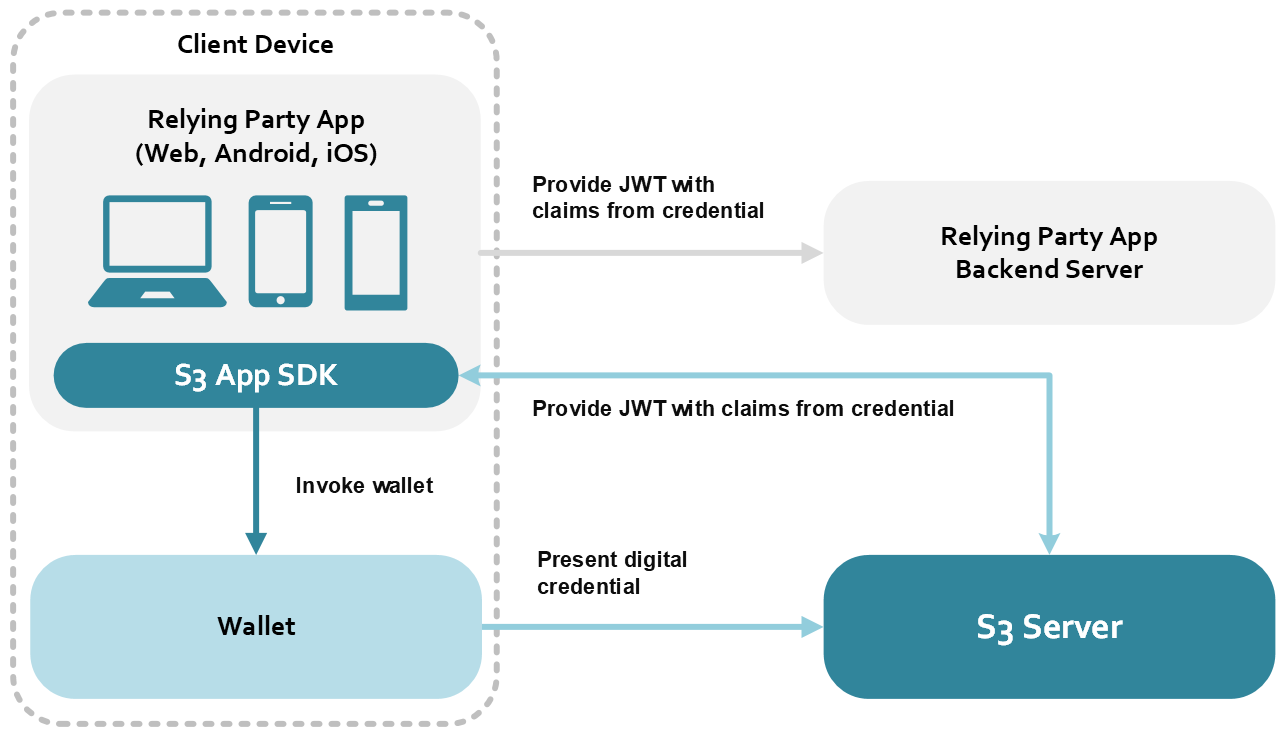
The diagram1 above demonstrates how information is exchanged between
the relying party application
the relying party application server
the wallet, and
the DigipassONE Verify server
when a user presents their digital credentials to login or complete a transaction.
Integration overview
Enabling digital credentials on your application may require both server-side and application-side development, and will generally follow this process:
Server side
Deploy the server
Customers can request a tenant to be created on the cloud, otherwise they may install the DigipassONE Verify server in their data center and create databases to store user data. The API Server is also installed at this time.
Configure the server
The server must be configured to enable digital credentials.
Application side
Tutorial apps
Learn implementation via the Tutorial Apps
The DigipassONE App SDKs include lightweight applications that will help you learn how to implement digital credentials. These Tutorial Apps should also prove instructive when building your own apps for Android, iOS and web.
Test your implementation
You can verify if your implementation works by installing a Tutorial App and testing it with:
a mobile device using a native app or mobile browser, or
a desktop or laptop using a browser.
Your own app
Design the authentication flow
Decide which policies and criteria you will use and specify which app operations will require verification so you can design the best experience for your users.
Integrate digital credentials on your own apps
Once you have completed these steps, you should be ready to implement digital credentials on your own applications.
1 This diagram assumes the user already has a digital credential in their wallet. These credentials are verified by the server.